Mario Party Minigame Robot (OpenSauce 2025)
I built an autonomous robot that physically plays Mario Party minigames using computer vision and hardware actuation. Then I took it to OpenSauce 2025 and challenged Ludwig to button mashing.
The Idea
When Mario Party Jamboree came out in late 2024, I watched content creators like Ludwig play the game on Twitch. There was a minigame called Cookie Cutters that was a 1v3 game where you press buttons corresponding to cookie shapes on a tray. Since I had some solenoids lying around it seemed mechanically simple enough to automate.
So I spent a weekend in December building a proof of concept: 3D-printed mounts for the solenoids to press the Joy-Con buttons, basic computer vision to detect the shapes, and using a capture card to record the gameplay. Once I got it working I made a quick video and left it there.
Proof of concept video from December 2024
I’d been watching nearly all of the featured creators at OpenSauce for years, so when exhibitor applications opened for 2025’s event, I knew I wanted to submit something. Most projects at maker fairs are showcases, but I wanted to build something where attendees could interact with the booth.
I called the project Deep-Boo - a play on “Deep Blue” (IBM’s chess-playing computer) and “Boo” (the Mario ghost). In Mario Party, Boo steals coins and stars from the players so it seemed fitting for a project about beating humans.
Mario Party minigames were an ideal medium since they’re short, self-explanatory, and designed to be fun. I went through all 110+ minigames in Mario Party Jamboree and categorized them by feasibility - some were pure button mashing, some required complex CV, some were completely RNG based, and some required motion controls I couldn’t automate. I applied with my Cookie Cutters prototype, figuring if I got accepted, I’d have the motivation to build the full system.
Building Deep-Boo
The Joystick Problem
The original prototype only needed button presses, but to play additional minigames I also needed to control the joystick. That meant building a mechanism that could move the Joy-Con stick to any (x, y) position with precision.
After some research, I came across a video of a spherical parallel manipulator (SPM) simulation. The concept clicked immediately: a Joy-Con joystick rotates in two directions around a fixed point. If I mounted two motors with their axes pointing through the center of the joystick, I could use linkages to control each axis independently and target specific (x, y) positions based on step counts.
I initially designed around small N20 motors, but ended up with NEMA 17 stepper motors. They were slightly overkill, but cheap enough to experiment with. I found a STEP file of the Joy-Cons online, which made the initial CAD straightforward, but fitting everything into a compact space while integrating bearings and bushings for smooth movement took significant iteration.
Testing the joystick mechanism actuation
The Calibration Challenge
Steppers are open-loop - they don’t know where they are unless you tell them. I ended up using TMC2209 drivers because they have StallGuard, which can detect when the motor hits a physical endstop. I added hard stops in the CAD model and then used those as reference points for homing.
But I also needed to verify the stepper positions matched the Joy-Con’s actual analog readings. So I built a calibration routine: connect the Joy-Con to my PC over Bluetooth, read its internal potentiometer values while measuring the current STEP position on the motor, and compare the two. It only worked during setup (since the Joy-Con has to be connected to the Switch via Bluetooth during gameplay, leaving the robot to just mechanically actuate the buttons), but it was enough to dial in the mapping.
PCB Design
This wasn’t my first time doing circuit design, but it was my first time custom ordering PCBs. I was tempted to jump into KiCad but opted for Fritzing since I was mainly connecting dev boards. Debugging the UART configuration between the TMC2209 drivers and the ESP32 taught me more about hardware communication than I expected.
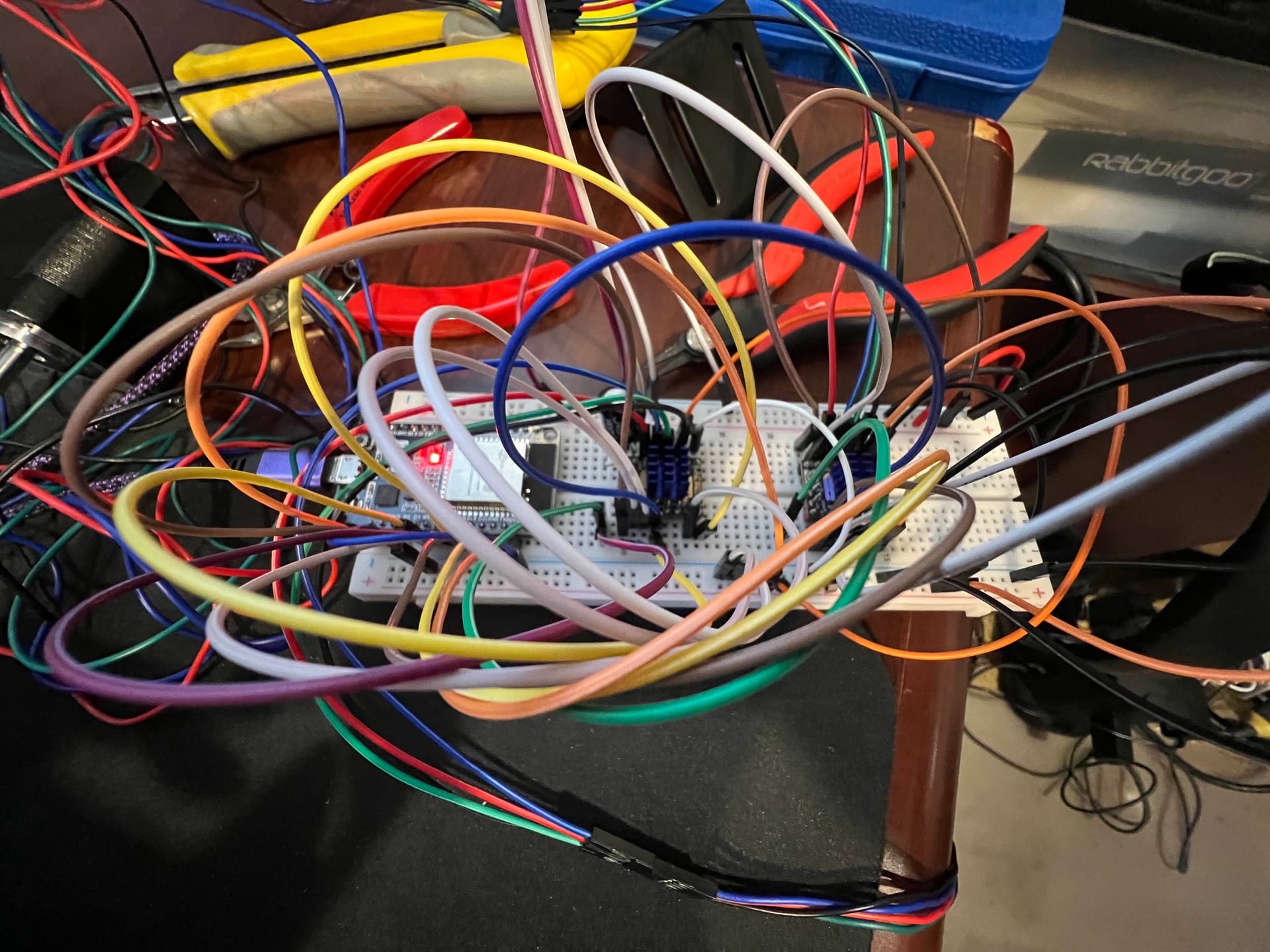
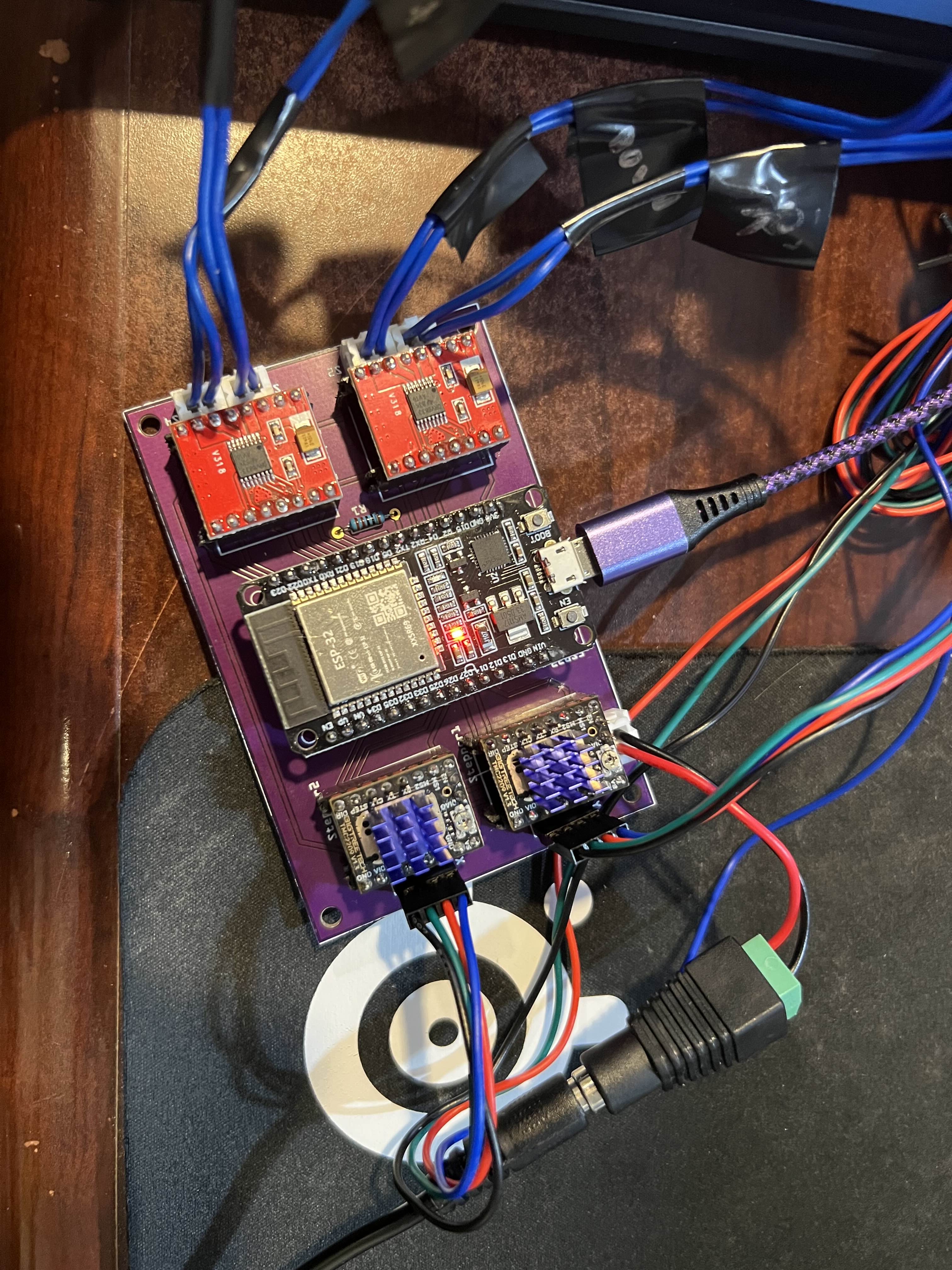
Left: Breadboard prototype. Right: Final PCB
The Computer Vision System
A lot of the difficulty in developing minigame solutions was understanding the active game state - detecting which phase we were in (menu, instructions, countdown, gameplay, results) and when transitions happened. I implemented a state machine to track this, with template matching to detect each phase.
While I was still finishing the hardware, I started developing the computer vision system. I’d record clips of each minigame and iterate on detection thresholds and strategies offline.
Getting the capture pipeline right took some debugging. I needed enough resolution to isolate small regions of the screen, but low enough overhead to maintain consistent 60fps for tight timing windows.
At 720p, colors weren’t too bad, but thresholding would be off if the capture card connected with the wrong codec. Sometimes I had to get creative and filter in both RGB and HSV colorspaces if there were multiple shades of the same color.

The minigame selection menu
Each minigame had unique challenges:
Unfriendly Flying Object (joystick + timing): A 1v3 minigame where the solo player controls a spaceship and drops spike platforms to crush opponents below. The robot used the joystick to track player positions and timed button presses to drop platforms. This was one of the better showcases for the spherical parallel manipulator since most other games were button-focused.
Cookie Cutters (shape detection): Classify circles, stars, and squares in a 3x3 grid in real-time. I used reference image comparison - comparing each grid cell against pre-captured templates and picking the shape with the lowest pixel difference.
On-Again, Off-Again (timing sequence): This ended up being my main booth game. I extracted frame-perfect timings from the speedrun world record video by watching when the POW block at the top of the screen changed between frames and extrapolating the intervals. The first 9 button presses follow a precise pattern, then it randomizes. So I executed the speedrun sequence, then switched to random intervals for the rest of the game.
Domination (button mashing): Pure solenoid speed. About ~20 Hz sustained (≈190-200 presses in 10 seconds). Most people max out around 8-12 Hz.
The hardest CV problem was Thwomp the Difference, a spot-the-difference game where you identify which fruit card is different from the others. I used HSV hue thresholding to identify fruit types, then template matching to distinguish between subtle variations (like tall vs short grape bunches). Most of the difficulty was implementing the logic since in later rounds there are additional cards and possible fruit variations. I’d estimate it had about a 50ms reaction time between the card reveal and registering the button press, but that didn’t stop people from believing they could beat it.
The Puppet System
Since timing between attendees would be inconsistent and people would spend varying amounts of time on practice menus, I needed manual control over initiating games and navigating menus. I used a third Joy-Con connected to my PC over Bluetooth to puppet the robot - feeding its inputs directly to the ESP32. This also meant attendees couldn’t accidentally navigate to the wrong screen, since I controlled Player 1.
Real-time mirroring of Joy-Con inputs
System Architecture
For reference, here’s what the final system looked like:

Full system design in Fusion 360
Vision Pipeline:
- 720p @ 60 FPS via HDMI capture card
- OpenCV for template matching, color detection, contour analysis
- State machine to track game phases (menu → instructions → gameplay → results)
- Dual RGB/HSV filtering for robust color detection
Hardware:
- ESP32 microcontroller running firmware with priority command queue
- TMC2209 stepper drivers with StallGuard for endpoint detection
- TB6612FNG H-bridge drivers for solenoid control
- Custom spherical parallel manipulator for analog joystick control
- Bluetooth Joy-Con connection for calibration verification
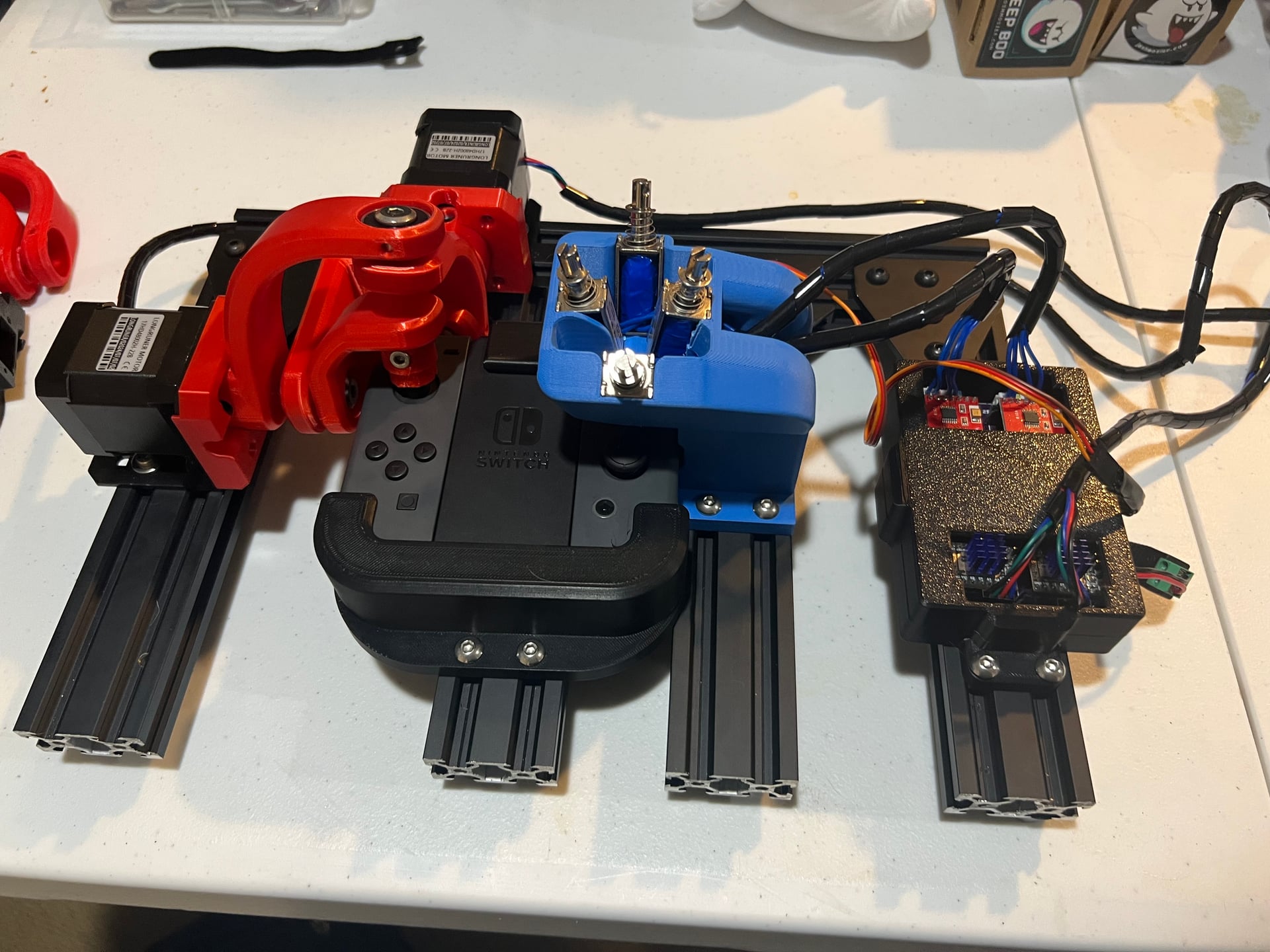
The business end: steppers, solenoids, and linkages
Building Deep-Boo required working across mechanical design (the SPM linkages, bearings, and 3D-printed housings), electrical engineering (PCB layout, stepper drivers, solenoid control), embedded firmware (ESP32 timing and communication protocols), and computer vision (real-time game state detection). Getting all of these systems to work together reliably made it one of the most interdisciplinary projects I’ve taken on.
OpenSauce 2025
I flew from Virginia to San Francisco the Thursday before the event. I was originally planning to attend with a friend but he got sick at the last minute. Luckily, my sister was able to come and fill in for me so I could attend some of the shows at the event. (Thanks Becca)
I had packed everything in a Pelican case, so it took me a few hours to re-assemble everything on Friday and set up the rest of the booth. Thankfully, there weren’t any major issues.
One unexpected adjustment I did make was to put electrical tape over the solenoid tips. The sound of them hitting the buttons was loud in the open hall. With the tape, it was manageable but plenty noisy to surprise people and assure them they had no chance of beating the bot.
The Booth Experience
My booth wasn’t in the main hall, but that worked out well - there was plenty of space for people to watch the gameplay from behind while waiting their turn. Many people were already familiar with Mario Party and if they weren’t it didn’t take long to learn the controls.
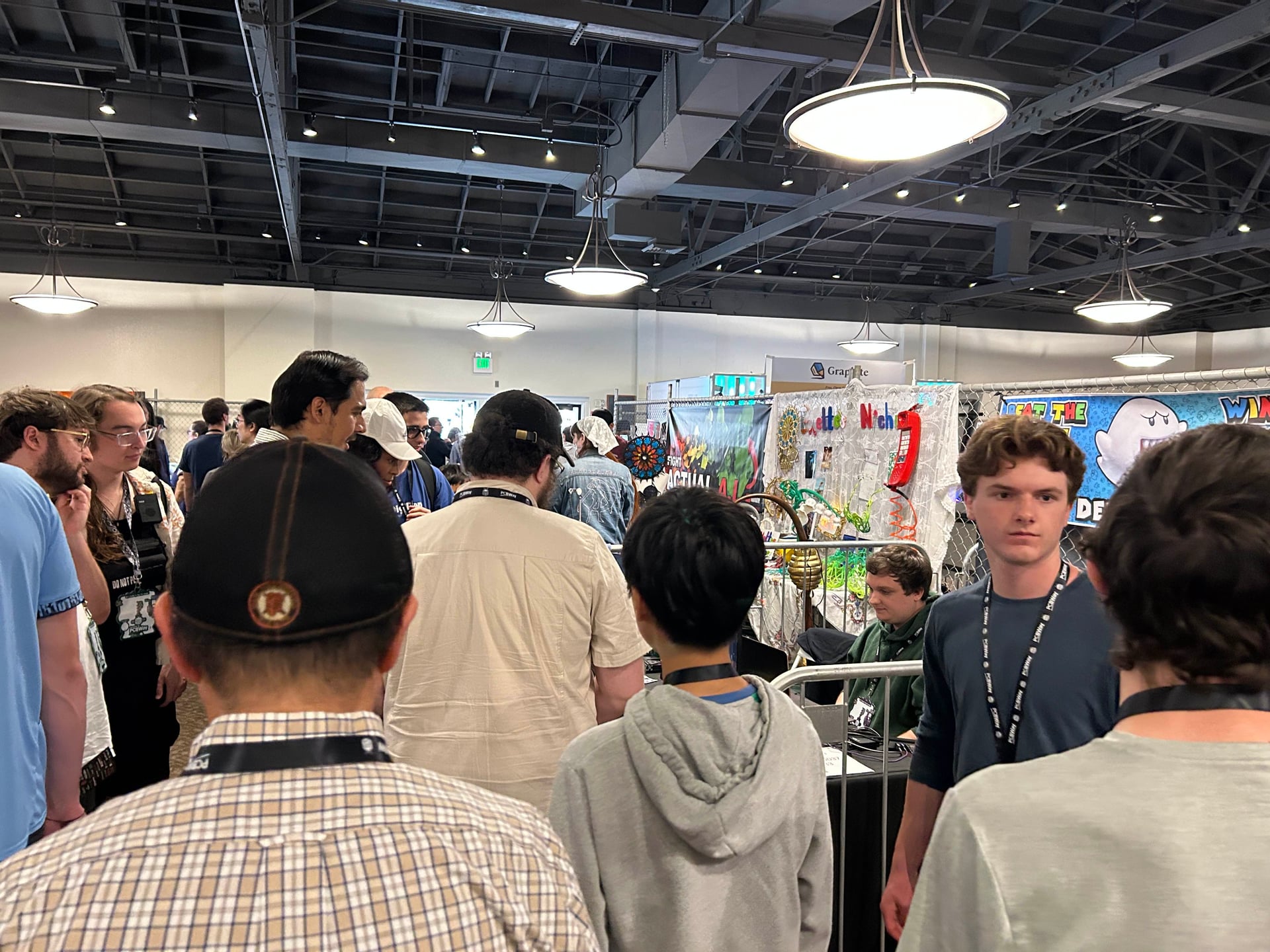
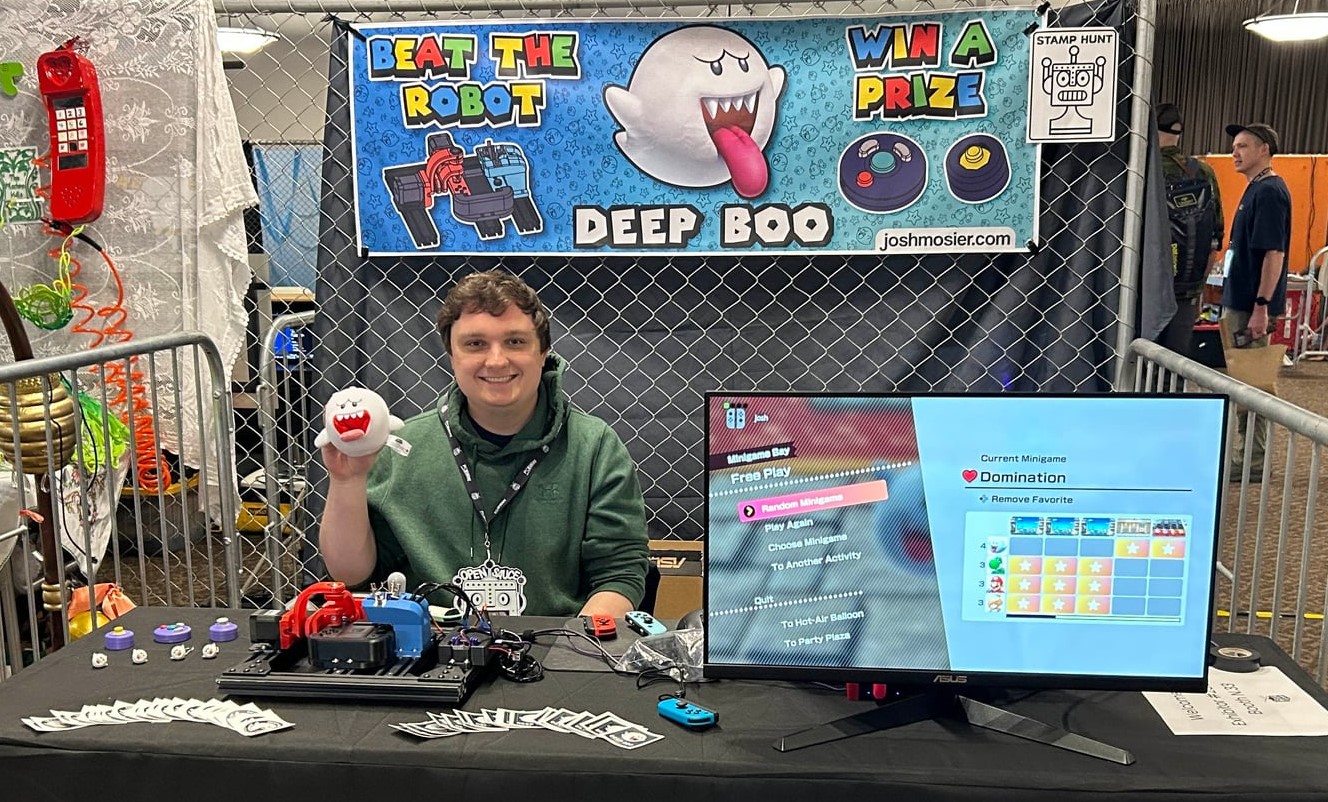
The booth setup at OpenSauce 2025
Some people didn’t realize at first that they were playing against a physical robot. Since I could puppet the Joy-Con manually to navigate menus, I could demonstrate the mechanisms in real-time - moving the joystick and pressing buttons myself to show visitors what was actually happening when they were playing.
A common comment: “Wouldn’t it be easier to just do this in software?” My answer: it feels better to see what’s actually beating you. You can watch the solenoids fire, see the joystick move. It would be a lot less satisfying to lose to a program than to a physical robot using the same controls (but mostly I just wanted an excuse to build a robot).
The Prizes
I’d designed custom prizes for people who could beat the bot. From previous GameCube controller modding, I had a lot of spare parts, so I made fidget toys based on the Nintendo gachapon toys: joystick fidgets with real potentiometer modules, and facebutton fidgets that actually click. I’d also printed around 100 Boo figures as keychains using multicolor filament. For people who couldn’t beat the bot, my sister helped me make a few hundred “Deep-Boo” stickers to hand out.
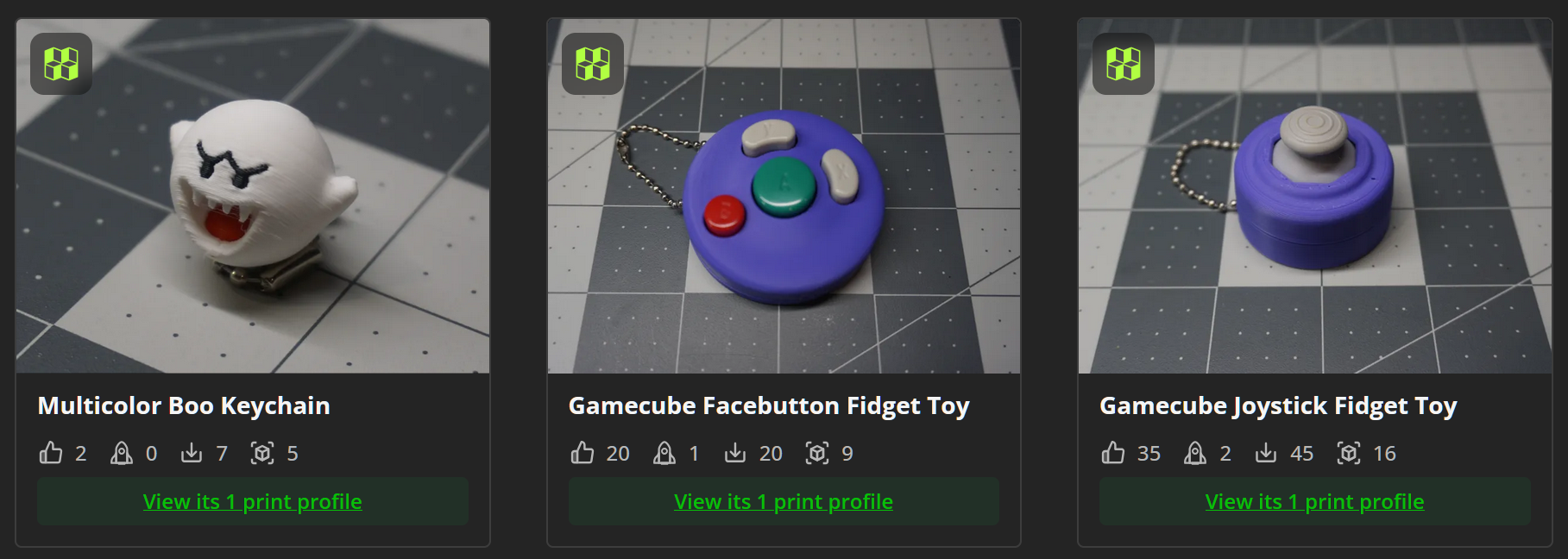
Joystick and facebutton fidget prizes and 3D-printed Boo keychains
The win rate on On-Again, Off-Again was about 5% - hard enough that I didn’t give away all the prizes on day one, but easy enough that winning felt possible. Most other games like Domination were basically impossible to win, but people would try them after beating the main game just to see what else the robot could do.
My favorite interactions were kids who would play for 10 minutes, fail repeatedly, then finally get a win and excitedly pick out their prize. One family showed up on Saturday, couldn’t beat it, and came back on Sunday morning specifically to try again and finally won.
Meeting Ludwig
On Saturday, three members of The Yard podcast - Nick, Aiden, and Ludwig - stopped by my booth. They were featured creators at the event and I had gone to see their show earlier in the day.
Ludwig is known for button mashing and used to hold the world record in Domination in a prior version of Mario Party. Having him play against the robot was the interaction I was looking forward to the most.
They had seen the Mario Party screen and immediately asked to load up Domination. Most people realize they have no chance the moment the solenoids start firing but Ludwig gave it his best shot. In the first round, the robot won 160 to 140. In the second round, Ludwig pushed to 166 presses - by far the best human score of the whole weekend - but due to variance the bot still took it with 194.
Ludwig and The Yard playing Domination against Deep-Boo
I’d made custom fidget toys in The Yard’s podcast colors specifically for the possibility of this interaction. I didn’t get to meet the fourth member (Slime) and give him the fidget in person, but a few weeks later I happened to be watching his Twitch stream when he showed it off as an example of one of his favorite gifts from a fan.
Things That Worked
The entire weekend went surprisingly well. Nothing broke. I had backup parts for most of the small components, but I was relieved when everything just… worked.
The Joy-Cons used by the mechanisms were always plugged into chargers. The three spare Joy-Cons I used for players 2/3/4 needed battery swaps on Sunday, but that took only a few minutes.
I ran out of fidget toys by Sunday afternoon and started just giving away the 3D-printed Boo keychains to anyone who stuck around.
At one point my sister was waiting in line at a food truck and overheard a dad and son ahead of her talking about their favorite booth at the event. They happened to name mine and she ended up chatting with them about it.
Reflections
If I rebuilt it today, I’d start hardware earlier - testing from video didn’t account for real-world delays. The timing values for games like Sled to the Edge came from on-hardware testing a few days before the event, something I should have done much earlier.
I’d also use the joystick more. Most games I targeted were button-focused. Games like “Camera Ready” (find the right picture by moving the joystick to pan/zoom the camera) or “Snow Brawl” (aim and throw snowballs) would have required more sophisticated real-time tracking and showcased the SPM better.
And I’d finish more minigames. I only implemented 6 of the 10 I originally scoped. It worked since most people were happy after beating the main one, but more minigames would have been a better technical demo.
I won’t be able to attend OpenSauce 2026 (no thanks Becca), but the platform has potential beyond Mario Party. I’d probably expand to more complex minigames or expand to other games like Mario Kart. Since I won’t be exhibiting next year, I might make a video of the robot playing the notoriously difficult toy baseball game from Clubhouse Games 51.
But for now, Deep-Boo accomplished what it set out to do: beat humans at Mario Party, entertain attendees, and narrowly defeat Ludwig at button mashing.
The full source code and hardware design files are available on GitHub for those interested in the technical implementation details.